AI-powered voice recorder that transcribes, translates and extracts tasks from your conversations in real-time.
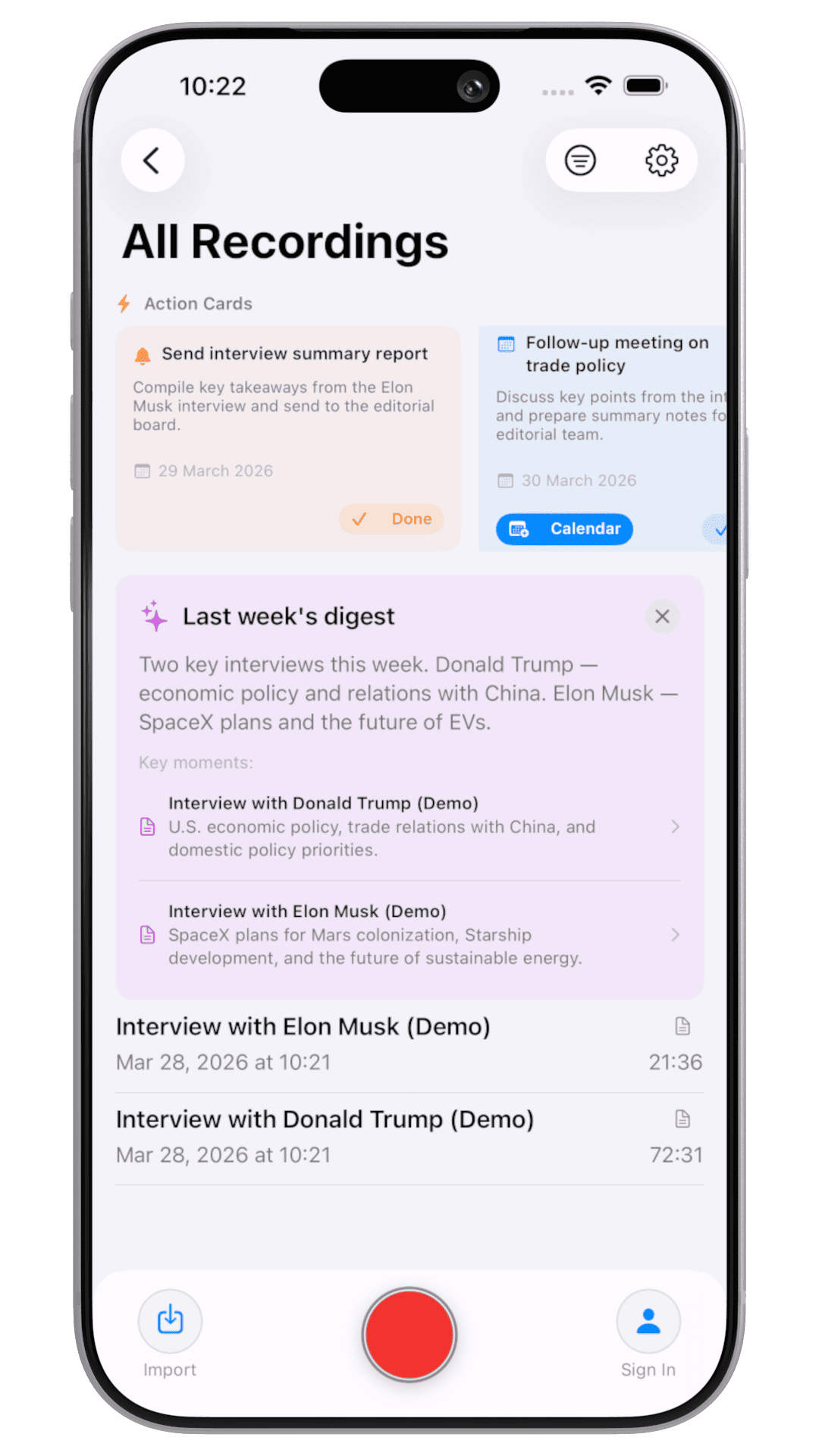
Listens to your conversation in real-time. AI analyzes speech on the fly. Two modes: Q&A and Live Translation.
RAW format protects against crashes and battery loss. Auto-recovery of interrupted recordings.
Removes silence before transcription. Save time and money.
YouTube, Instagram, TikTok, X, RuTube links. Share Extension. Auto audio extraction.
Real-time speech translation with partial and final results.
Ask questions across all your recordings using AI.
Trim, merge, split recordings
End-to-end data protection
AI listens to your conversation and instantly provides answers on screen. Toggle between Q&A and Translation modes.
Hundreds of recordings and you can't remember where it was. Just ask — AI finds the exact answer with a link to the recording, speaker and timestamp.
After transcription, AI automatically pulls out action items, mentioned contacts and events. Add to calendar or save a contact in one tap.
AI automatically detects and hides names, phone numbers, addresses and other sensitive data. Critical for lawyers, doctors, HR specialists.
Turn on the MCP server and connect Lunir AI to Claude, ChatGPT, Cursor and any MCP-compatible app. They search and read your transcripts for you — strictly read-only, and only after you approve.
Ask in plain language — the assistant finds the exact moment across all your recordings.
search_recordings
Browse your whole library with pagination and filters.
list_recordings
Pull any transcript as plain text, SRT subtitles or JSON.
get_recording
Instant totals across your library, with the same filters.
count_recordings
You're always in control: enable it per device with a 4-digit PIN, approve access on a consent screen, and revoke it anytime. Access is read-only, OAuth-secured and scoped to your account.
Translate the entire transcription preserving timestamps and speaker labels.
Any audio/video from Files, Gallery, or iOS Share Extension. MP4, MOV, AVI, M4A, WAV, MP3.
AI identifies speakers (diarization) and separates their speech with rename support.
AI extracts question-answer pairs into a structured list.
Generate emails, action plans, custom prompts. Save your own prompts for reuse.
PDF, DOCX, CSV, TXT, Markdown — with timestamps, speaker labels and formatting.
All transcriptions indexed by CoreSpotlight. Find from system search instantly.
Live recording timer in Dynamic Island. Pause/resume from Lock Screen.
Start a new recording in one tap directly from the widget on your Home Screen.
Add key terms before transcription for better recognition of medical, legal or tech jargon.
Custom folders, Favorites, Recently Deleted. Tag recordings for quick classification.
Standard (64kbps) for speech or Professional (128kbps HD) for podcasts and music.
See size of each recording and total storage. Find orphaned files and clean up.
Updates about new features, promotions and promo codes — right in the app.
Custom promo code system + Apple Offer Codes. Instant activation.
Accidentally deleted a recording? Restore it from the Recently Deleted folder.
AI finds recordings similar in meaning to the current one using embeddings.
Up to 10 hours in one go. Longer files can be split and transcribed in parts.
Auto-generated overview of all recordings for the week with key themes and actions.
iCloud, Google Drive, pCloud. Auto-sync recordings, transcriptions and translations.
Connect your own LLM via OpenAI-compatible API. Choose provider and model.
Disable Wi-Fi and cellular with one tap so calls and notifications never interrupt a recording.
Trigger any Apple Shortcut automatically when recording starts or stops.
Semantic search within a single transcript — jump straight to the matching fragment and highlight it.
Edit the text with autosave, undo/redo and one-tap restore of the original.
Choose Light, Dark or System appearance — your pick is remembered.
After each transcription, finished PDFs are emailed to up to 10 recipients automatically.
Full feature set. Dynamic Island, widgets, Share Extension.
Optimized for large screen. Perfect for lectures and meetings.
Record system audio + microphone. Full desktop experience.
Record from your wrist. Auto-sync with iPhone.
Background recording. Share to Lunir AI from any app.
Tuned for large screen. Comfortable for long sessions.
Start free. No credit card required.